A Field Guide to MCP
What the Model Context Protocol is, the pieces it is made of, and the map of the rest.

The Model Context Protocol is how an AI application reaches the tools and data it needs. By mid-2026 it is a Linux Foundation standard with an official registry and support across the major platforms. This opening piece lays out the problem, the client-host-server architecture, the six primitives, and the map, anchoring a five-part series.
Before USB-C, every device came with its own charger and cable, and none of them fit each other: a drawer full of adapters for one job. USB-C replaced that with a single port that anything can plug into. MCP is USB-C for AI applications: one standard way for any AI app to connect to any tool or data source, instead of a custom integration built by hand for every single pairing.
Every useful AI application eventually needs the same thing: a way to reach the world outside the model. Your files, your database, your ticketing system, your code host. The model is clever, but on its own it is sealed in a box, and the whole game is getting the right context in and letting it take real actions out.
The Model Context Protocol, MCP, is the standard way to do exactly that. It is worth being precise about the word "standard" here, because a lot changed quickly. Anthropic introduced MCP in late 2024; within about a year the major model providers and cloud platforms had adopted it, an official server registry had appeared, and the protocol had been donated to the Agentic AI Foundation, a directed fund under the Linux Foundation, and put under open governance. As of mid-2026 it is not a promising idea anymore, it is shared infrastructure. That is exactly why it is worth learning properly. This is the first piece of a five-part series that walks the entire protocol; this one lays out the shape.
The problem it solves
Before a standard existed, every application wired up every integration by hand. If you had M applications and N tools, you were on the hook for something close to M times N bespoke connectors, each with its own shape and its own quirks. Every new tool meant re-integrating with every app.
MCP collapses that. A tool provider writes one MCP server, and any MCP-capable application can use it without custom glue. The official docs reach for a hardware analogy that genuinely helps: MCP is a USB-C port for AI applications. One standard socket, many things you can plug into it. The integration math drops from M times N to M plus N.
The architecture
MCP uses a client-host-server model. Three roles, worth pinning down because they blur together easily.
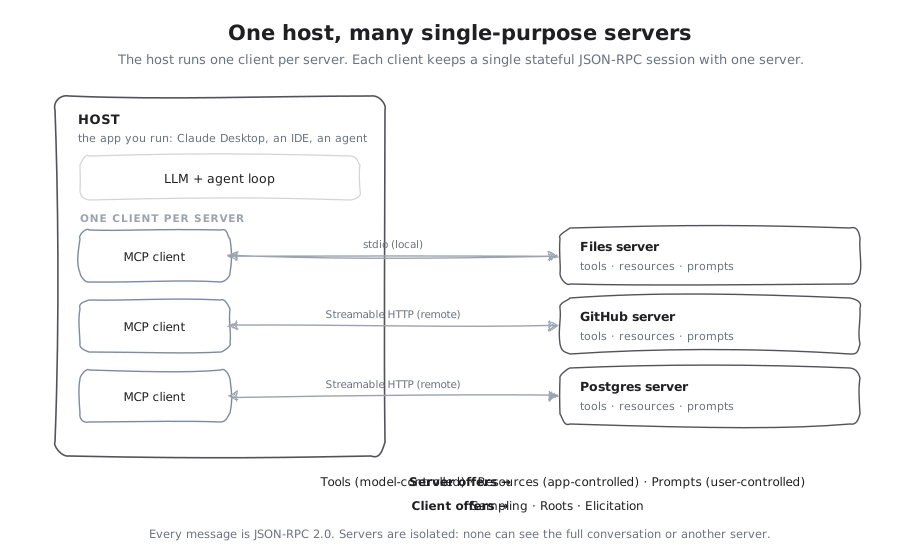
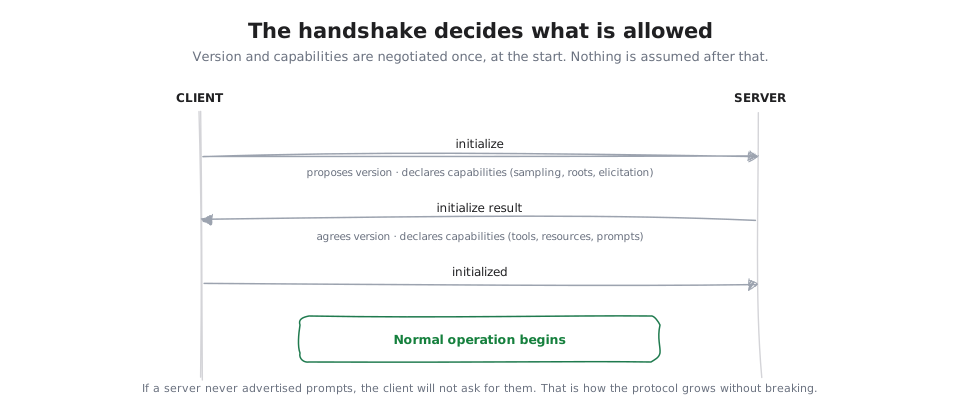
The host is the application you run: a desktop assistant, an IDE, an agent. It owns the model and is where the human stays in control. A client lives inside the host; the host creates one client per server, and each client holds a single stateful session with exactly one server. That one-to-one isolation is deliberate: a server cannot read your whole conversation or see into another server. A server is a focused program that exposes one capability well, and it has no idea what else the host is connected to. Underneath, every message is JSON-RPC 2.0, and when a client and server first connect they negotiate a protocol version and declare which capabilities they support.
Step through a whole session once and the shape becomes concrete:
The pieces
Rather than a fixed pipeline, think of MCP as five families of parts. Learn these and everything else has a place to hang.
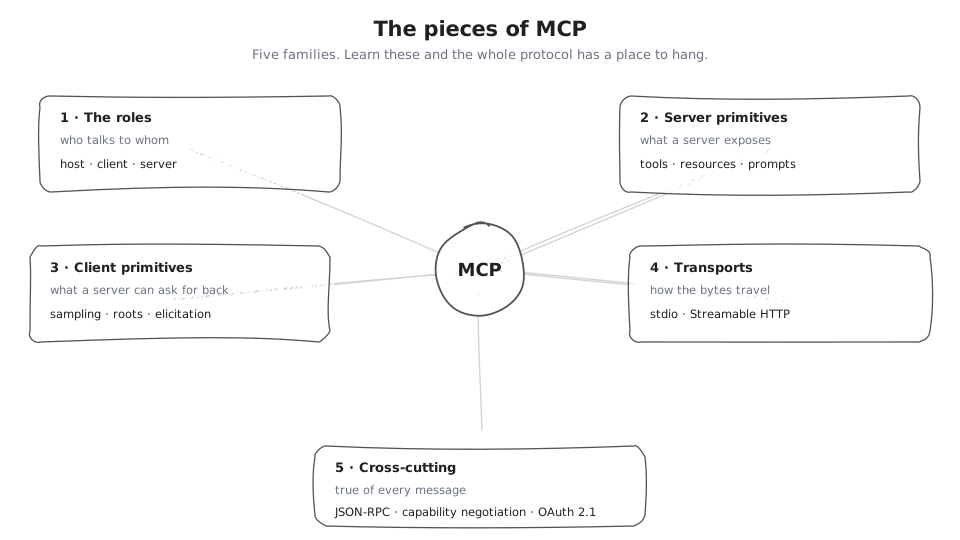
- The roles. Host, client, server, and how they relate. Covered above.
- The server primitives. Tools, resources, and prompts: the three things a server exposes. Deep-dive in The Six Primitives.
- The client primitives. Sampling, roots, and elicitation: the three things a server can ask the host to do. Also in The Six Primitives.
- The transports. stdio for local servers, Streamable HTTP for remote ones, plus the lifecycle handshake that sets everything up. That is MCP on the Wire.
- The cross-cutting concerns. JSON-RPC and capability negotiation, true of every connection, plus authorization once a server is on the network. Security and auth get their own piece, Trust and Authorization.
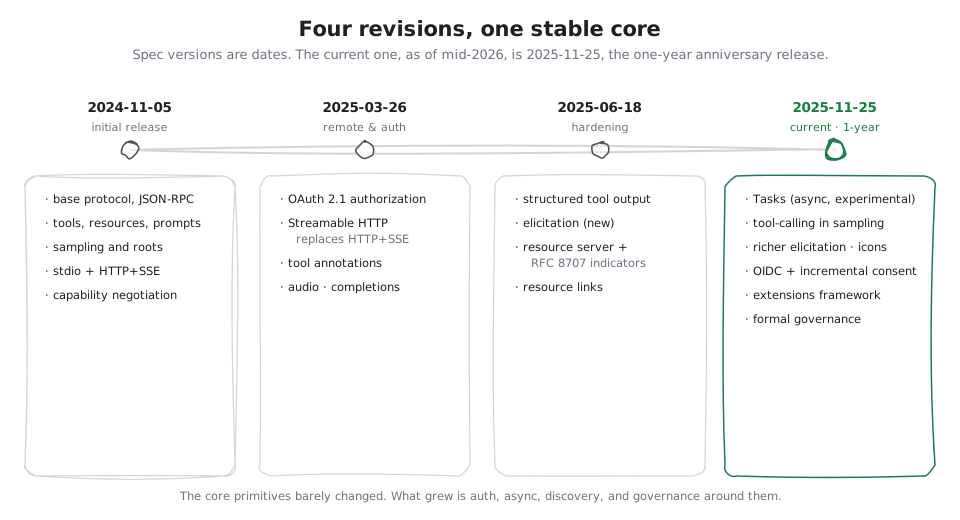
The protocol has grown around these, not away from them: an official registry for finding servers, an extensions framework (the first official extension, MCP Apps, brings interactive UI), an async Tasks mechanism, and a real governance structure. The series closes with How MCP Grew, which walks the revision history, the ecosystem, and where it is heading.
The one idea to carry in
If you strip away the vocabulary, MCP is a small, sane thing: a stateful JSON-RPC session between a host and a set of isolated servers, exposing six primitives, with capabilities negotiated up front. That core has been stable across every revision since launch, and it is safe to build on. Everything the rest of this series covers, the primitives in detail, the transports, the auth, the history, is detail hanging off that frame. Get the frame first, and the details stop being a pile of acronyms.