CDNs: The Cache Nearest Your Users
How a CDN works from the ground up: edge locations near users, pull vs push, how long the edge keeps a copy (Cache-Control), the cache key and why query params wreck your hit rate, purging when content changes, and the origin shield.

A from-the-ground-up look at CDNs, the cache nearest your users. Why serving from a nearby edge beats a round trip to a far origin, how content reaches the edge (pull vs push), how long the edge keeps it (TTL and Cache-Control, max-age vs s-maxage, stale-while-revalidate), the cache key and how marketing query params fragment the cache, purging and versioned URLs when content changes, and the origin shield that turns a thundering herd of edge misses into one origin fetch. Everyday analogies, a hand-drawn diagram, and a visualizer per idea.
This is the last stop in the caching arc. We kept copies close to the database (caching), decided what to forget (eviction), kept them honest (invalidation), and survived a hot key expiring (the stampede). Now the cache moves all the way out to the edge of the network, next to the user.
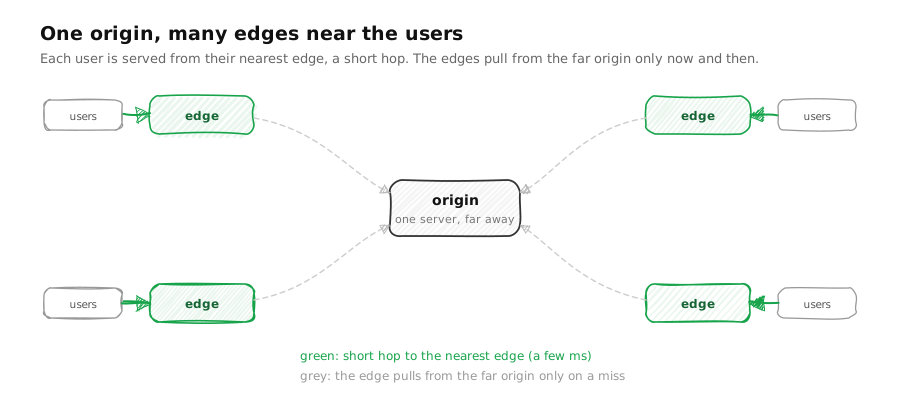
You do not ship a bottle of water from the factory every time someone is thirsty. You stock it in the corner shop on their street. The factory is hundreds of miles away; the shop is a two-minute walk. A CDN, a content delivery network, does exactly this for your website: it keeps copies of your content in edge locations in cities all over the world, so a user is served from one a few milliseconds away instead of from your one origin server on another continent.
The nearest shelf: edge locations
Distance is time. Light in fibre is not instant, so a request to a server on another continent and back can cost 150 milliseconds or more before a single byte of real work happens. An edge location (a point of presence, or PoP) in the user's own city cuts that to single digits. The CDN's whole job is to make sure the copy is on the nearest shelf.
A user in Tokyo is served from the Tokyo edge in about 9 ms, instead of the round trip to the far origin at roughly 160 ms. The copy is kept close, so the trip is short.
How content reaches the edge
An edge starts empty. There are two ways to get your content onto it, and they trade first-visitor speed against upfront cost.
Pull
The corner shop does not pre-stock everything. The first time someone asks for an item it does not have, it orders one from the warehouse, puts it on the shelf, and every customer after that gets it off the shelf instantly.
A pull CDN works the same way, and it is cache-aside from the caching piece moved to the edge. The first request for a file misses at the edge, the edge fetches it once from your origin, keeps a copy, and serves every request after that itself. It is the default because it needs no work from you: you just point the CDN at your origin.
First request for this file at the edge: a miss. The edge fetches it once from the origin and keeps a copy on the way back.
Push
For something you know will be in demand, you pre-stock every shop before opening day, so even the first customer walks out with it.
A push CDN uploads your content to every edge at deploy time, before anyone asks. Even the first request in a region is a hit, because you paid the cost up front. For very high traffic to stable assets (a launch video, release binaries), push can be cheaper, because you avoid the origin fetch on the first hit in every region.
At deploy time you upload the file to every edge, before anyone asks for it.
How long the edge keeps it: Cache-Control
Every stocked item has a sell-by date. Cache-Control is the header your origin uses to stamp that date on each response, and every cache between you and the user obeys it. It is TTL, the same timer we met in eviction, now spoken in HTTP.
Every item carries a timer. Each tick all timers count down; when one hits zero it expires and leaves, whatever else is true about it.
A real header carries several directives at once:
Cache-Control: public, max-age=60, s-maxage=86400, stale-while-revalidate=30
Read it left to right. public means any cache may store it. max-age=60 tells the
user's browser to keep it for 60 seconds. s-maxage=86400 applies only to shared caches
like the CDN and overrides max-age for them, so the edge holds the copy for a day even
though browsers keep it a minute. And stale-while-revalidate=30 is the same trick from
the stampede piece: for 30 seconds past expiry, the
edge may serve the stale copy immediately while it refreshes in the background, so nobody
waits on the origin.
The cache key: what counts as the same request
The shelf label is what tells the shop that two requests are for the same thing. On a
CDN that label is the cache key, and by default it is the whole URL, including the query
string. That default has a sharp edge. If your links carry marketing tags, then
/logo.png?utm=fb and /logo.png?utm=tw look like two different files, so the edge
stocks a separate copy for each, and your hit rate collapses as one poster becomes a
dozen near-identical copies.
By default the key is the whole URL, so ?utm=fb and ?utm=tw look like different files. Three near-identical requests, three separate copies, a wrecked hit rate.
The fix is to normalize the key: tell the CDN to ignore the tracking parameters, so all those variants map to one slot and share one cached copy. Worked example: with the raw key, one image shared by three campaigns is three cache entries and three origin fetches; normalized, it is one entry and one fetch. Getting the cache key right is often the single biggest lever on a CDN's hit rate.
When content changes: purging the edge
A CDN makes staleness worse in one way: now the wrong copy is cached in a hundred cities, not one. So you need a way to recall it. There are two moves, and we met both in the invalidation piece. The blunt one is to purge: tell the CDN to drop a file, by exact URL or by a tag attached to a group of files. The cleaner one is to never overwrite at all, and instead give the new version a new name, so the old URL is simply never requested again.
The cache key carries a version: item:42?v=1. Reads ask for it, hit, and get fresh data.
That second move is why the CSS and JavaScript of almost every site you visit is served
as something like app.4f2c9a.js, with a content hash in the name. Those files are
marked cacheable for a year, safely, because that exact URL can never change contents;
when the code changes, the page references a new hash, which misses everywhere and fills
fresh. Purge for the occasional recall, versioned names for everything you can.
Origin shield: one fetch to the origin
Here is the CDN-scale version of the stampede. Suppose a popular file expires on every edge at the same moment. Now it is not one server that misses and refills, it is every edge location on Earth, all fetching the same file from your origin in the same instant. Your origin, which was comfortably serving a trickle, is hit by a thundering herd.
If every corner shop in the country runs out of the same item on the same day and all phone the factory at once, the factory is swamped. So you put a regional warehouse in between: the shops call the warehouse, and the warehouse calls the factory once.
Without a shield, when a popular file expires everywhere at once, every edge fetches it from the origin at the same moment. Five edges, five simultaneous origin hits.
That warehouse is an origin shield: a single mid-tier node that all the edges fetch through, so the origin sees one request instead of one per edge. It is the same idea as the request-coalescing lock from the stampede piece, applied across a global fleet of caches.
Where this leaves caching
That is the whole ladder. A request looks first in the browser, then at the CDN edge nearest the user, then in your application cache, and only then in the database, and at each rung the rules are the same ones we have now seen five times: keep a copy close, decide what to forget, keep it honest, and do not let a hot miss stampede the thing behind you. The CDN is just the rung that sits closest to the person waiting, which is why, for anything served over the web, it is the highest-leverage cache of them all.