How to Design a System
The repeatable six-step routine for any 'design X' problem, so you never freeze and never miss the parts that matter: scale, failure, and cost.

Day one of the System Design series. Before any load balancers or databases, you need a way to think. This is the six-step routine, scope, estimate, API, data model, high-level design, then deep dive, walked through on a real example (a link shortener). With an everyday analogy, a hand-drawn diagram, and an interactive visualizer that shows the routine turning a vague prompt into a design.
This is day one of the System Design series. Each day is one small topic, in plain words, with a picture and an interactive demo. We start with the most important thing, which is not a piece of technology at all. It is how to think.
Someone says "design a system that shortens long links, like bit.ly." A blank page. Most people do one of two things: they freeze, or they jump straight to "I'll use a database" and start drawing boxes with no idea what the boxes are for. Both go badly.
Here is the whole routine at a glance, turning a vague prompt into a finished design. Step through it once, then we will walk each step in detail below.
Someone says 'design a link shortener.' A blank page. The urge is to freeze, or to jump straight to a database with no plan.
The analogy: a good doctor has a routine
When you visit a good doctor and say "I do not feel well," they do not guess a prescription on the spot. They run the same routine every time: ask what is wrong, ask your history, examine you, order tests, reach a diagnosis, and only then treat you. The routine is boring, and that is the point. It is why they rarely miss something serious.
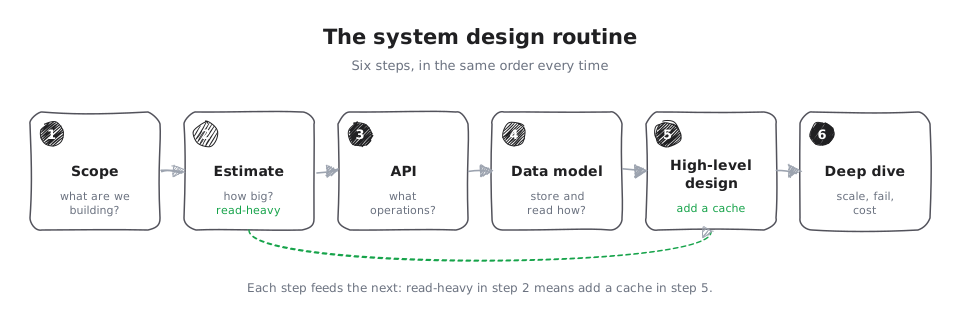
System design has the same kind of routine. Six steps, in the same order every time. Learn it once and you will never stare at a blank page again. Here it is, and we will run it on the link shortener as we go, so each step has a worked example.
The six steps
Below is each step in turn, with its own short visualizer. The hand-drawn map first, then the detail.
1. Scope
First, agree on what you are building. Ask questions and separate the must-haves from the nice-to-haves, and say out loud what you are leaving out. For the link shortener: must-have is "take a long URL, return a short one, and redirect when someone visits it." Nice-to-have is custom links and click analytics, which we note and set aside. Naming what you will not build is a senior move.
Split the must-haves from the nice-to-haves, and say out loud what you will not build.
2. Estimate
Do quick napkin math for size. Is this read-heavy or write-heavy? How much data? For the link shortener: people click short links far more than they create them, so it is very read-heavy, maybe 100 reads for every write. That one number will shape everything later (it says "cache the reads").
One rough number decides the shape. Far more reads than writes means the reads should come from a cache.
3. API
Define the handful of operations. This pins down the contract before you design the insides. For the
link shortener there are just two: create(longUrl) returns shortUrl, and visit(shortUrl) returns a redirect to the long URL.
The whole contract is two calls: one to make a short link, one to follow a short link. Pin this down before designing the insides.
4. Data model
List the things you store and how you will read them. For the link shortener you store a mapping from short code to long URL, and you almost always look it up by the short code. That access pattern ("look up by short code") tells you a simple key-value store fits better than a complex relational database.
You only ever look up by the short code, so a simple key-value store beats a complex relational table.
5. High-level design
Now draw the boxes and arrows: the path a request takes from the user to the answer and back. For the link shortener: a user hits a load balancer, which sends the request to one of several small servers, which look up the code in a fast key-value store (with a cache in front, because we said it is read-heavy) and return the redirect.
Boxes and arrows: the request goes user, load balancer, server, cache, then straight back. The cache hit is why it feels instant.
6. Deep dive, failure, and cost
Finally, pick the two or three hard parts and go deep: how it scales, what happens when a piece fails, and what it costs. For the link shortener: how do we generate short codes that never collide? What happens if the cache goes down? This last step is where a design stops being a toy.
The hard parts are where a design becomes real: short codes that never collide (check, and retry on a clash), and a plan for when the cache goes down (fall back to the store).
The order matters. Each step feeds the next: the estimate ("read-heavy") drives the design ("add a cache"), and the access pattern drives the data store. Skipping around is how you miss things.
Two habits that make it work
First, think out loud. In an interview or a design review, the routine is also how you show your thinking. Say which step you are on and why. Second, always reach step six. Beginners spend all their time drawing boxes (step five) and never talk about failure or cost. Leaving time for the last step is the single biggest difference between a junior answer and a senior one.
Where this goes
That is the whole routine: scope, estimate, API, data model, high-level design, then the deep dive. Every other topic in this series is really just going deeper on one of these steps. Tomorrow we take step two on its own, the napkin math, and learn to size a system in your head: requests per second, storage, and bandwidth, without a calculator.