Beyond the Vector
When flat vectors are the wrong shape for the knowledge. GraphRAG (local and global search), multimodal RAG beyond text, the family tree from the 2020 paper to RETRO and Atlas, and the long-context-versus-RAG debate ending in cache-augmented generation.
The last piece of the RAG series: when flat vectors are the wrong shape for the knowledge. GraphRAG with local search and global search as separate ideas, multimodal RAG's two strategies (shared embedding space and translate-to-text), the family tree (RAG-Sequence, RAG-Token, REALM, Fusion-in-Decoder, RETRO, Atlas), the long-context-versus-RAG debate, and cache-augmented generation. Each with an everyday analogy and an interactive visualizer.
Ask "what connects these three people" and flipping to single pages will not help; you have to trace the links between them. Flat vector search is very good at pulling the one relevant passage, and blind to questions whose answer is spread across many and lives in how they connect. That is where graph-based retrieval comes in.
This is the last part of a series on RAG. Everything so far assumed the knowledge lives as a flat pile of text chunks in a vector index. Most of the time that assumption is fine. This piece is about the times it is not, and about where RAG came from and where it is going. As always, each idea gets an everyday analogy first, then the mechanism, then a demo.
GraphRAG: when the answer is spread across the corpus
Flat vector RAG has a blind spot, and it is a fundamental one. It retrieves the chunks most similar to your query, which works beautifully when the answer sits in a few specific passages. It falls apart when the answer is not in any single passage. Ask "what are the main themes across these thousand documents" and there is no chunk to retrieve, because the answer is an emergent property of the whole corpus. No amount of better embedding fixes this; the unit of retrieval is simply wrong.
GraphRAG changes the unit. Instead of indexing chunks, it builds a knowledge graph.
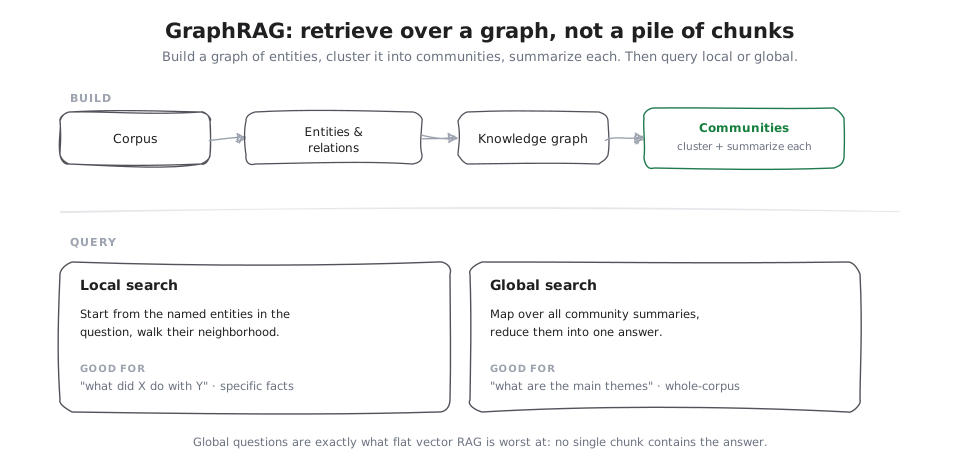
To build the index, it uses a model to extract entities and the relationships between them from the text, assembles those into a graph, and then detects communities of densely connected entities, the way you can glance around a party and pick out the friend-groups, the clusters where nearly everyone already knows everyone, before writing a short summary of each such group. The cost is real, building the graph is an expensive indexing step, so GraphRAG earns its keep when whole-corpus understanding is the point, not when you just need to look up a fact. The difference from flat retrieval is easiest to feel on a question whose answer is a few hops away. Toggle between flat vector retrieval and following the graph:
That graph gives two very different ways to query, and they are worth separating, because they answer opposite kinds of question.
Local search
Start with someone you know and ask their friends, then their friends' friends. You never survey the whole city; you just walk outward from a name, collecting whatever is connected. That is local search: it starts from the specific entities named in your question and walks their neighbourhood in the graph, ideal for pointed questions about particular things.
Local search starts at the entity your question names, here “Ada”.
Global search
Now the opposite. To understand a whole company you do not read every email; you ask each department for a one-page summary and combine those into the big picture. Global search does exactly that: it maps your question over every community summary and reduces the partial answers into one, ideal for the broad, thematic questions flat RAG cannot touch.
The graph is clustered into communities, each with its own summary.
Multimodal RAG: retrieval beyond text
The other assumption worth breaking is that the corpus is text. A great deal of the knowledge people need lives in images, tables, charts, diagrams, slides, audio, and video. Multimodal RAG retrieves across those, and there are two broad strategies. Either way the generation step needs a model that can actually read what was retrieved, so multimodal RAG and multimodal models rise together. As documents are increasingly half-picture, this stops being exotic and starts being table stakes.
Shared embedding space
Imagine everyone, and every picture, speaking one common language. Then a written question can point straight at a photograph, because both are phrased in the same tongue. That is the first strategy: embed text and images into a shared multimodal space, so a text query can retrieve an image directly, the approach behind CLIP-style models.
Everything, words and pictures, is embedded into the same space by a CLIP-style model.
Translate to text first
The other strategy is humbler and often easier: hire someone to write a caption under every picture, then just search the captions like any other text. It translates non-text into text first, captioning images, parsing tables, transcribing audio, and retrieves over those representations with ordinary text RAG.
Turn each non-text item into text first: caption images, parse tables, transcribe audio. Then retrieve over the descriptions with ordinary text RAG.
The family tree
It is worth seeing where all of this came from, because the modern techniques are branches on an old trunk, and the roots explain the design choices.
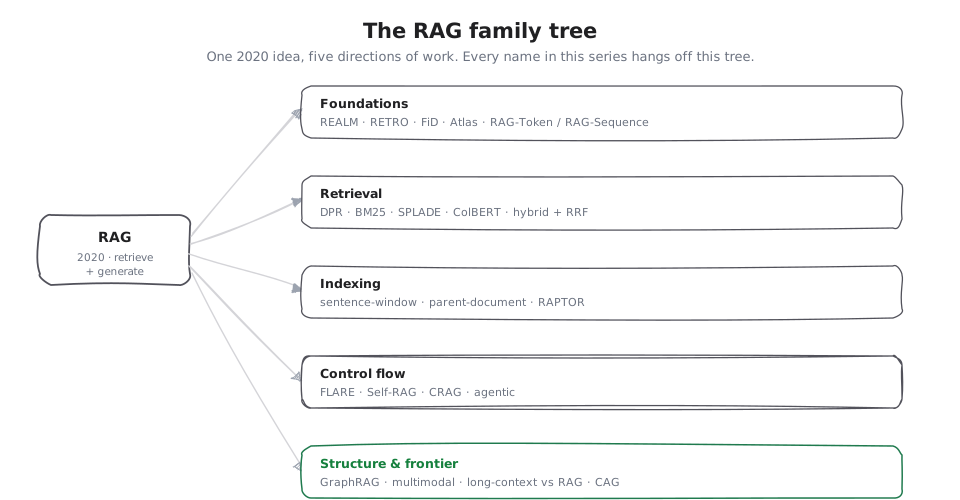
The term comes from the 2020 RAG paper, which already offered two flavours: RAG-Sequence, which retrieves once and writes the whole answer out of that one chosen set of documents, and RAG-Token, which picks each word from whichever of the open books on the desk happens to have it, attending to different documents for different tokens of the answer. Around the same period, REALM put retrieval inside pre-training rather than bolting it on afterward, learning the habit of looking things up while growing up instead of being handed a reference book only as an adult, and Fusion-in-Decoder (FiD) showed how to encode many retrieved passages separately and let the decoder fuse them at the end, like reading each source on its own and taking separate notes, then combining the notes, instead of cramming every source onto one crowded page, which scales to far more passages than stuffing them all into one context.
Then the ambitions grew. RETRO retrieved from a trillion-token store during pre-training through chunked cross-attention. Picture the model, as it writes each part of a passage, glancing at a few relevant reference snippets pulled just for that part, rather than trying to have memorized the whole library; that is what chunked cross-attention buys. It showed a smaller model could match a much larger one by reading instead of memorizing. Atlas pushed retrieval-augmented models into the few-shot regime. Everything in the earlier pieces of this series, DPR and ColBERT and SPLADE, RAPTOR and sentence windows, Self-RAG and FLARE and CRAG, GraphRAG and multimodal, hangs off this same trunk. Naming the lineage is what turns a pile of acronyms into a map.
Long context vs RAG: do you even need it?
The most interesting current debate is whether RAG survives long context. When a model can read a million tokens, why retrieve at all, why not just put everything in the prompt? Think of it as a bigger desk. A bigger desk lets you spread out more papers at once, which is genuinely useful, but it does not fetch the papers for you, and past a point a cluttered desk actually slows you down.
The honest answer as of now: long context and RAG are complements, not rivals. Long context relaxes how much you must retrieve and how precise your chunks must be, because you can afford to pass more and let the model sort it out. But it does not make retrieval obsolete. Cost and latency scale with tokens, so stuffing a whole corpus into every request is wasteful when a good retriever could send a fraction. Attention still degrades over very long inputs, the way your focus drifts by page 300 of a dense report, so adding pages 300 to 900 does not mean you truly take them in, and piling on more does not automatically buy accuracy. And a corpus that does not fit even in a million tokens still needs retrieval, full stop. Retrieval decides what the model reads; long context decides how much it can read at once. Both matter.
Cache-augmented generation (CAG)
The sharpest expression of the "just preload it" instinct is cache-augmented generation. Instead of walking to the filing cabinet for every question, you memorize the whole short handbook once; then every question is answered from memory, instantly.
When your knowledge base is small enough to fit in the context window, you can preload it once, compute the model's key-value cache over it, and reuse that cache across every query, no retrieval step, no vector database. That key-value cache is just the mental notes the model takes on the first read, the ones that let it answer later without reading the whole handbook again, only glancing at the notes. It is a genuinely good answer for small, stable corpora, and a clarifying one: it shows that RAG is fundamentally a response to knowledge that is too big, too fresh, or too private to sit in the weights or the cache. When none of those pressures apply, you may not need RAG at all. When they do, some point in the space this series mapped is your answer.
Preload the whole small corpus once and compute the model's key-value cache over it. This happens a single time.
The through-line
Five pieces, one idea: a language model is only as good as what you put in front of it, and RAG is the discipline of putting the right thing there. Retrieval mechanism, indexing, control flow, structure, lineage, those are the dials. Naive RAG sets them all to their simplest setting. Everything else in this series is turning one dial, for a reason, to fix a specific failure. Learn the failures and the dials follow.