DNS: The Internet's Phone Book
A dedicated look at DNS: how a name becomes a number, the chain of servers that answers a lookup, why answers are cached, and how DNS also sends you to the nearest server and around a failure.
A deep look at DNS, the building block introduced in the request-path overview. How a name becomes an IP address, the lookup chain from your resolver up to the authoritative server, why answers are cached (TTL), and how DNS does more than lookups: sending you to the nearest server and routing around a dead one. Everyday analogies, a hand-drawn diagram, and a visualizer per idea.
The request-path overview met three building blocks: DNS, the load balancer, and the gateway (how a request finds a server). We gave the load balancer its own piece. DNS deserves one too, because it does more than you would think.
Think of the contacts app on your phone. You know a person by name, but to actually call them your phone needs their number. You look up the name, get the number, and dial. You remember names; the phone remembers numbers.
The internet works the same way. You type guptasachinn.com, but computers do not find each other by name. They find each other by number, an IP address like 192.0.2.5. DNS, the Domain Name System, is the phone book that turns the name into the number. Nothing can connect until this lookup happens, which makes DNS one of the busiest and most important systems there is.
A name becomes a number
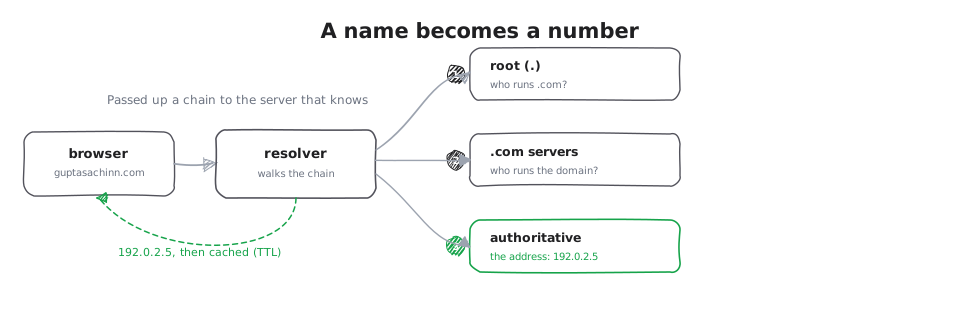
The everyday version first: you hand over a name and get back a number. Your browser asks a DNS resolver for guptasachinn.com, the resolver returns 192.0.2.5, and only then can the browser connect.
And just like you remember a number you dialed a minute ago rather than looking it up again, the resolver caches the answer for a while. How long is set by the answer itself, a value called TTL (time to live). Until it expires, the same lookup is instant and never leaves your machine. The visualizer below shows the first visit (a real lookup) and the next visit (straight from cache).
The first time, your browser asks a DNS resolver to turn the name into an address.
Where the answer comes from: the lookup chain
So who does the resolver ask? This is the part people never see. No single machine holds the whole phone book. Instead the resolver is passed along a chain, like calling directory assistance and being transferred until you reach someone who actually knows.
It goes like this. The resolver asks a root server, "who handles .com names?" The root does not know guptasachinn.com, but it knows who runs .com, and points there. The resolver asks the .com servers, "who handles guptasachinn.com?" They point to that domain's authoritative server, the one that actually holds the answer. The resolver asks it for the address, and gets 192.0.2.5. Three hops, and then it is cached so it does not happen again for a while.
Your resolver does not know guptasachinn.com yet, so it starts asking around.
Doing more than lookups: nearest and around failures
Here is why DNS is a system design tool, not just a lookup. The answer to "what is the address for this name" does not have to be the same for everyone.
Nearest server. A big service runs servers in many regions. DNS can hand a visitor in Europe the address of the European servers and a visitor in Asia the Asian ones, so everyone reaches something close and fast. This is often called GeoDNS: same name, different number depending on where you ask from, like a chain store's directory giving you the number of your nearest branch.
Around a failure. Because DNS decides which address a name points at, it can point away from trouble. If a whole region goes down, the name can be updated to hand out a healthy region's address instead, and new visitors are steered around the outage. It is slower to take effect than a load balancer (because of all that caching), but it works across the whole planet.
Where this goes
That is DNS end to end: it turns a name into a number, answers by walking a chain of servers up to the one that actually knows, caches the result so it does not repeat, and quietly steers you to the nearest healthy server. Next, the other front-door building block from the overview: the gateway.