How a Request Finds a Server
The first building blocks: how a request reaches one of your servers, explained as arriving at a huge office building, look up the address, get seated by the host, check in at the front desk.

Day three of the System Design series, and the first building blocks. When someone uses your system, the very first thing that happens is their request finding a server. This walks the journey: DNS turns a name into an address, a load balancer spreads requests across servers, and a gateway is the shared front door for auth, rate limiting, and routing. Each explained with an everyday analogy first, a hand-drawn diagram, and its own interactive visualizer.
Day one gave us the routine, day two the napkin math (sizing a system). Those were ways of thinking. From here we build with real parts. We start at the very beginning of any request: how it even reaches one of your servers.
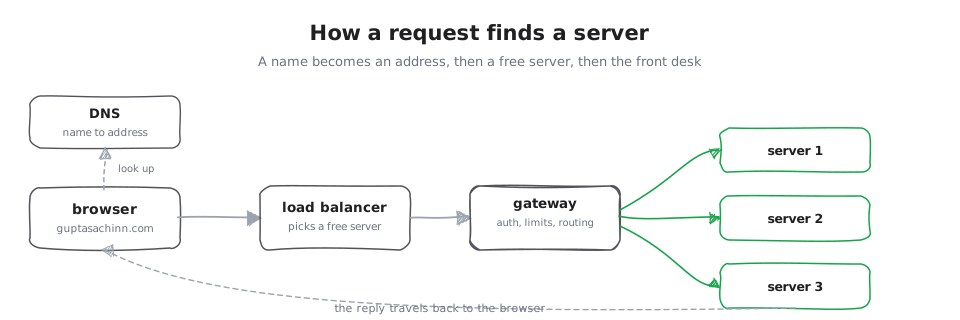
Type a web address, hit enter, and a page appears. Behind that is a small journey. Your request has to find one specific server out of millions, then get past the front door. Picture arriving at a huge office building: first you look up the street address, then a host inside points you to an open desk, then the front desk checks who you are and sends you the right way. The internet does the same three things, and they have names: DNS, a load balancer, and a gateway.
Every request hops through each of these before a page comes back.
DNS: the internet's phone book
Think of the contacts app on your phone. You know a person by name, but to call them your phone needs their number. DNS is that phone book for the internet: it turns a name you can remember, guptasachinn.com, into the address a computer actually needs, 192.0.2.5, and caches the answer so the next lookup is instant.
There is more to it, the chain of servers that answers a lookup and how DNS steers you to the nearest one, so it has its own piece: DNS, the internet's phone book.
The load balancer: a host at the door
Picture a busy restaurant with one host at the door. Diners arrive, and the host seats each one at a table that is open, spreading people out so no single waiter is swamped. If a waiter goes home sick, the host simply stops seating their tables.
Now the real thing. One popular address is served by many identical servers, not one. A load balancer sits in front of them and sends each incoming request to a server that is not busy, so the load is spread out. It runs quiet health checks and, if a server stops answering, it stops sending requests there until it recovers. This is how a system serves millions of people without any one machine falling over, and how it survives a server dying without users noticing.
The load balancer does more than seat diners: how it chooses a server (round-robin, least-connections, and more), how it notices a dead one, and the two kinds it comes in. That is a topic of its own, so it has its own piece: load balancers, up close.
The gateway: the front desk
Picture the front desk of an office building. Everyone entering goes through it: it checks your ID, turns you away if you are coming too often, and points you to the right floor. A gateway is that front desk for your system, one place that authenticates, limits, and routes every request, so each service behind it stays simple.
It is also where a confusing family of names lives (gateway, reverse proxy, load balancer), so it has its own piece: the gateway, one front door.
Where this goes
That is the journey: a name becomes an address (DNS), the address reaches a host that picks a server that is not busy (the load balancer), and a front desk checks you in and routes you (the gateway). Every request your system ever serves starts this way. Each of the three has its own deeper piece, linked above. Then we make it fast: caching and CDNs, the trick of keeping answers close so you do not do the same work twice.