Sizing a System on a Napkin
Back-of-the-envelope math for system design: turn users into requests per second, storage, and bandwidth, in your head, rounding hard.

Day two of the System Design series, and step two of the routine on its own: estimation. Learn to size a system with three numbers, throughput (requests per second), storage, and bandwidth, using rounded napkin math. Worked all the way through on the link shortener from day one. With a jelly-bean analogy, a hand-drawn diagram, and an interactive visualizer that rolls the numbers up as you go.
Yesterday we learned the six-step routine for any design: scope, estimate, API, data model, high-level design, then the deep dive (day one is here). Today we take step two on its own, because it is the one people skip, and it quietly decides everything.
Someone asks "how big is this system?" The wrong answers are "I do not know" and a five-minute attempt at the exact number. The right answer is a rough one, fast. Sizing is not counting. It is estimating.
The analogy: jelly beans in a jar
Guess how many jelly beans fill a big jar. You do not tip it out and count. You estimate: the jar is about this tall and this wide, a bean is about this big, so a rough number of beans fit. You will be off by a bit, and that is fine. Nobody needs the exact count. They need to know if it is closer to 500 or 50,000, because that changes what you do next.
System design sizing is the same. You want the order of magnitude, not the precise figure. And it comes down to three numbers.
The three numbers
Throughput: how many requests per second. Storage: how much data you keep, and how fast it grows. Bandwidth: how many bytes move per second. Get these three and you know whether this is a one-server job or a thousand-server job.
Two rounding tricks make the math easy in your head. First, use round numbers: a month is about 2.6 million seconds, so just call it "a few million." Second, separate average from peak: real traffic spikes, so after you get the average, multiply by 2 or 3 for the busy hour.
Worked example: sizing the link shortener
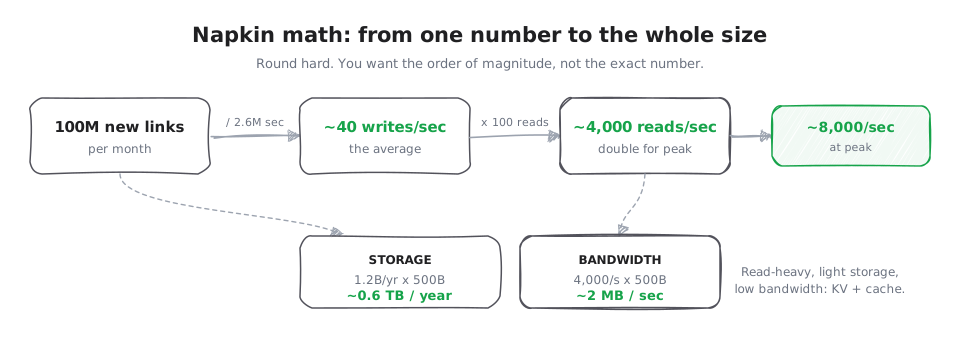
Let us size the link shortener from day one. Say it takes 100 million new links a month. We will find each of the three numbers in turn, with a visualizer for each.
Throughput
Picture the counter at a coffee shop during the morning rush. Throughput is how many customers it serves each minute. The total number of people who want coffee that day does not matter; what matters is the rate at the busiest moment. A system is the same idea: throughput is how many requests it handles each second.
Now the real numbers. A month is roughly 2.6 million seconds. So 100 million writes divided by 2.6 million seconds is about 40 writes per second. We said this system is read-heavy, roughly 100 reads for every write, so that is about 4,000 reads per second. Double it for peak traffic and call it 8,000 reads per second at the busy times. Already this tells you something: 8,000 reads a second is very comfortable for a cache, which is exactly why step five will put a cache in front.
The lane below turns that rate into something you can see. Switch between creates, clicks, and the peak, and watch the flow speed up.
100M a month, over ~2.6M seconds
Storage
Picture a filing cabinet. Every link you save is one more sheet of paper in a drawer. Storage is how big the cabinet has to be, and how quickly it fills. The question is not whether it is full today, but how many drawers you will need in a year.
Now the real numbers. Each link record is small: the short code, the long URL, and a little metadata, maybe 500 bytes. In a year you store 100 million times 12, which is 1.2 billion links. Times 500 bytes is about 600 gigabytes a year, so under a terabyte a year. That is small. It fits comfortably on a single modest database, with room to grow for years.
Scrub the months and watch the disk fill. The point is how slowly it climbs against the capacity line.
Each month adds 100M links x 500 bytes. It grows in a straight line, and a single disk lasts years.
Bandwidth
Picture a water pipe. Bandwidth is how much water can flow through it each second, and that depends on how wide the pipe is. A thin straw and a fire hose carry wildly different amounts. For a system, bandwidth is how many bytes can move per second between two points.
Now the real numbers. At 4,000 reads per second, each returning about 500 bytes, that is roughly 2 megabytes per second. Tiny. Bandwidth is just reads times bytes, and here it is a thread through a fat pipe. Push the sliders to see what traffic would actually fill the pipe.
Bandwidth is just reads times bytes. At 4,000 reads a second of 500 bytes, that is about 2 MB/s, a thread through a fat pipe. Push the sliders to see what would actually fill it.
Add it up and the shape of the system appears on its own: read-heavy, light storage, low bandwidth. So a simple key-value store with a cache in front will do. You did not need a giant cluster, and now you can say why, with numbers.
A few anchor numbers worth memorizing
Estimation is faster when a handful of numbers live in your head. A day is about 86,400 seconds (call it 100,000). A character is about 1 byte.
The speed numbers are the hardest to feel, so here is the picture: think about how far away your data is. Reading from memory is like grabbing a pen already on your desk. Reading from an SSD is like walking to the next room to fetch it. Sending a request across the world is like mailing a letter overseas and waiting for the reply. Each step is about a thousand times slower than the one before: memory about 100 nanoseconds, an SSD about 100 microseconds, a round trip across the world about 100 milliseconds.
Each rung is about 1,000x slower than the one above. If reading from memory took 1 second, a trip across the internet would take almost two weeks.
You do not need many. A few anchors plus rounding gets you most of the way.
Where this goes
You now have the two thinking tools: the routine (day one) and the sizing (today). From tomorrow we start on the parts themselves. First up: how a request even reaches one of your servers, which is the job of DNS and load balancers.